
 Australia
  Austria
  Belgium
  Brazil
  Canada
  Czech Republic
  Chile
Chile  Netherlands (EN)
  France
  Deutschland
  Ελλάδα
  Italia
  Ireland
  España
  Switzerland
  South Africa
  Polska
  Portugal (PT)
  Thailand
  Magyarország
  UK
UK  Norway
  New Zealand
  Finland
Lamba Bet Mobile App

Last Updated: Oct 12, 2026
Sports betting offer
525% Up to €8,000 + 475 Free Spins
Lamba Bet is Restricted

Lamba Bet Casino Mobile app
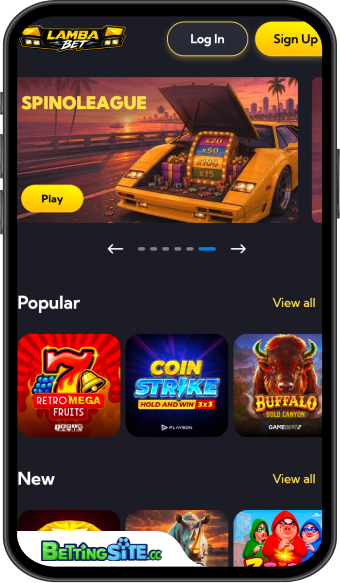 Lamba Bet takes a browser-based approach to mobile gaming, providing access to its casino and sportsbook without requiring a conventional app download. The platform offers home-screen installation instructions for Android and iOS, allowing the website to be opened directly from a smartphone shortcut. This provides convenient access without visiting Google Play or the Apple App Store. However, the shortcut is not a separately installed native application and its functionality remains tied to the website.
Sports betting is available through Lamba Bet’s dedicated web sportsbook, which separates upcoming fixtures from live events and provides individual match pages with grouped betting markets. The interface includes a persistent betslip, live match information and Bet Build on eligible football fixtures. Esports and simulated events occupy separate categories, making it easier to distinguish between conventional competitions and digital betting formats.
The sportsbook’s detailed event pages are an important consideration for mobile use. Major football fixtures can contain numerous marketing groups, making navigation more involved when exploring specialized selections rather than straightforward match outcomes.
Casino entertainment is similarly organized through dedicated collections for slots, feature-buy games, live casino tables and other gaming categories. Search functionality and provider filters provide alternatives to browsing the extensive library manually. The website also includes access to promotions, VIP rewards and account management features.
Payment availability remains dependent on account and regional conditions, regardless of the device used. Mobile access does not automatically introduce additional banking methods or remove the usual verification requirements.
Lamba Bet’s principal mobile advantage is its straightforward access across Android and iOS without the need for a separate application installation. The main trade-off is reliance on the website's navigation rather than dedicated native-app functionality. Its home-screen shortcut offers a practical alternative, although it does not establish features such as native push notifications or independently optimized app performance.
Lamba Bet Mobile App in other lanugages
